
Disclosure: BlogShog is operated by The Adroit, which is mentioned in this article.
Learn how to remove Japanese keyword malware from your website, clean spam URLs from Google, and secure your site using tools like robots.txt, spam-url.txt, and Google Search Console. Step-by-step guide + expert tips.
What Is a Japanese Language Malware Attack or Japanese Keyword Hack, which kills your SEO efforts in few days?
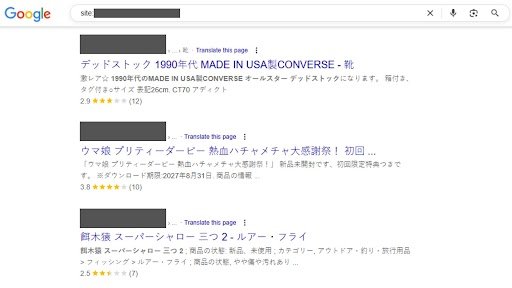
Japanese SEO spam is a type of malware attack where hackers inject malicious Japanese pages into your website. These pages are usually filled with Japanese text promoting fake products like luxury bags, branded shoes, electronics, etc.
Once infected, these pages get indexed by Google under your domain, causing your site to appear spammy in search results, severely damaging your SEO rankings, brand trust, and domain reputation. This issue is often referred to as the Japanese keyword hack WordPress site owners dread.
Real Examples of Japanese Spam URLs in Google:
yourdomain.com/612/cheap-nike-sale - ナイキ シューズ 激安通販yourdomain.com/983/index.php?q=バッグyourdomain.com/s91/セール
🔎 How to Identify Japanese Keyword Hack or Japanese Language Malware on Your Website
Detecting the malware early is crucial. Here’s how to start your investigation to fight with Japanese Language Malware
➡️ Your hosting provider (like Hostinger) often provides paid malware monitoring tools that alert you when your site is compromised.
➡️ If you’re using WordPress, install security plugins like Wordfence, Sucuri, or iThemes Security, which alert you in real-time when malware scripts or unauthorized changes are detected. This is especially useful when you’re trying to fix Japanese keyword hack fix issues quickly.
✅ Step 1: Check Google Search Console (GSC)
- Go to Google Search Console
- Go to Security Issues for any malware warnings or “Hacked content” notices
- Visit Indexing → Pages and Security Issues
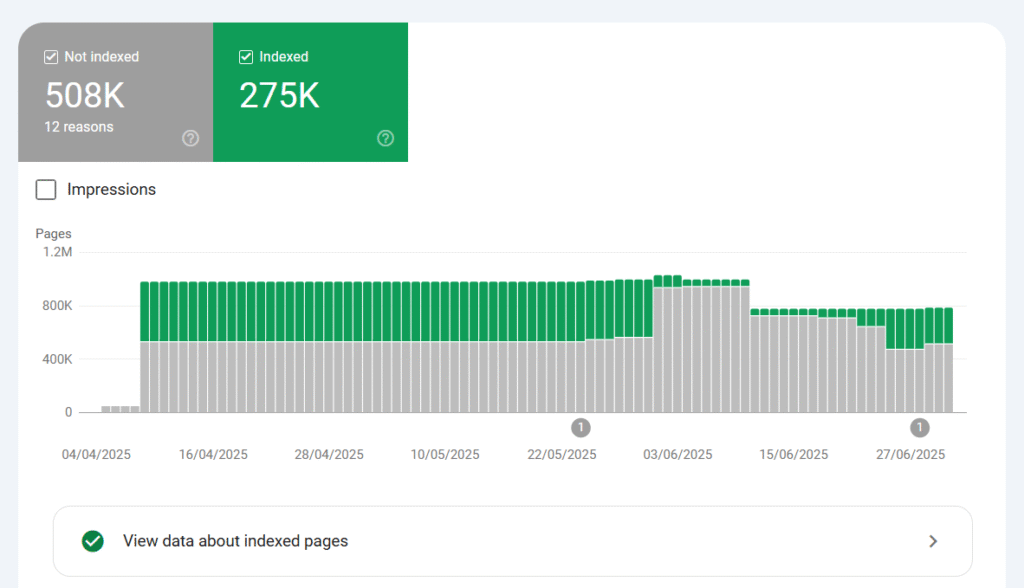
- If the number of Indexed and Not Indexed pages in Google Search Console is unusually high, it’s a strong indicator that your website may be infected with malware especially if you’re researching how to fix Japanese keyword hack fix issues. You can also estimate when the malware started affecting your site by observing the timeline of the increasing page count.
5. You can also use the following tools to scan your website for malware and identify potential security threats:
✅ Step 2: Use Google to Identify Indexed Spam URLs
Search using the site: operator:
site:yourdomain.com
This will display all indexed pages. If you find unknown or Japanese URLs, your site is likely infected by a Japanese keyword hack
fix, and it’s time to consider fixing the Japanese keyword hack before it worsens.
Step-by-Step Guide to Remove Japanese Keyword Hack Fix | Japanese Keyword Hack from WordPress or Any Website
Step 1: Backup Your Website
Before making any changes, create a full backup via cPanel, FTP, or plugins like UpdraftPlus.
Step 2: Scan & Clean Infected Files
Use malware scanners like:
- Sucuri SiteCheck
- Wordfence Security
- MalCare Security
Manually check for unknown folders:
/272/,/499/,/983/,/s91/, etc.- Clean
index.php,.htaccess, and suspicious PHP files
💡 If you’re unable to clean the malware yourself, reach out to your hosting provider or trusted third-party malware removal services like Sucuri, which can clean your hacked website within 24–48 hours.
Step 3: Update All CMS, Themes, and Plugins
- Update WordPress, plugins, and themes
- Even if an update requires the paid version, consider buying it or replacing it with a more secure plugin
🔐 Regular updates are essential. Every day, new viruses are developed and existing ones evolve. Tools like WordPress, Rails, PHP, HTML, Magento, etc. release security patches regularly — and you must stay updated to stay protected.
These steps are crucial for a successful Japanese keyword hack fix and for regaining your lost SEO rankings.
🤖 Step 4: Update Your Robots.txt File
A robots.txt file helps you block crawlers from indexing known malicious URLs.
➡️ Please do not delete your existing content. Just add the following lines at the end:
User-agent: *
Disallow: /*.html$
Disallow: /*.aspx
Disallow: /wp-admin/
Disallow: /988
Disallow: /954
Disallow: /222
Disallow: /232
Disallow: /272
Disallow: /499
Disallow: /612
Disallow: /983
Disallow: /index.php
Disallow: /s91
Disallow: /?
Upload the updated robots.txt file to the root of your website (/public_html/robots.txt).
📤 Step 5: Submit URL Removal Requests to Google
Now it’s time to start removing spam URLs from search results.
- Go to Search Console → Removals → New Request
- Use URL prefix removal, such as:
https://yourdomain.com/612/https://yourdomain.com/*.htmlhttps://yourdomain.com/*.aspx
- Check “Remove all URLs with this prefix” and submit
🗺 Step 6: Submit a Clean Sitemap
- Regenerate a fresh sitemap using Yoast, Rank Math, or any sitemap generator
- Go to Search Console → Sitemaps
- Submit
https://yourdomain.com/sitemap_index.xml
✅ This tells Google to recrawl your clean site and ignore blocked or removed spam URLs.
📄 Step 7: Use spam-url.txt for Mass Spam Removal
This technique helps you report a custom blocklist of infected URLs.
🔧 How to Build spam-url.txt
- Create a
.txtfile and list all known spam URLs:https://yourdomain.com/612/index.html https://yourdomain.com/272/ナイキ https://yourdomain.com/index.php?q=スニーカー - Save it as
spam-url.txtand upload to/public_html/ - Submit to GSC under Sitemaps:
https://yourdomain.com/spam-url.txt
📌 Repeat this weekly with updated spam URLs.
If you’ve experienced the Japanese keyword hack WordPress infection, don’t forget to resubmit your clean sitemap to tell Google your site is now safe.
🧠 Pro Tip: GSC displays only 1000 URLs at a time, so:
- Go to Pages → Why pages aren’t indexed
- Download the spreadsheet of excluded URLs
- Go to Links → Internal/External Links to uncover spam links
- Add all to
spam-url.txtand re-submit
🔁 Repeat Until Spam is Gone
This isn’t a one-time fix. You need to keep monitoring and repeating the removal process to ensure the Japanese keyword hack fix is permanent and your site remains secure.
Repeat these actions weekly:
- Check Google with
site:yourdomain.com - Inspect URLs in GSC → Indexing → Pages
- ⚠️ Some may still show “Indexed” even if blocked by
robots.txt— click and use “Inspect URL” to verify
- ⚠️ Some may still show “Indexed” even if blocked by
- Update
spam-url.txt - Submit new removal requests
🚨 What If Google Still Shows Japanese Spam URLs?
✅ Submit a Reconsideration Request (If Site Was Flagged)
If Google imposed a Manual Action:
- Go to Search Console → Manual Actions
- Click Request Review
- Add a note listing every step you’ve taken to clean the site
🛠 Report via Google Spam Report Tool
Use: https://search.google.com/search-console/report-spam
- Mention your domain, issue, cleanup steps
- Submit 3–5 example URLs
These methods are helpful when you’re actively working on fixing the Japanese keyword hack and need Google’s cooperation to remove the remaining spam URLs.
🔐 How to Prevent Future Japanese Malware Infections
✅ Secure Your Website
- Use security plugins like:
- Wordfence
- Sucuri Security
- iThemes Security
- Enable firewalls (WAF) with services like Cloudflare or Sucuri Pro
🔄 Keep CMS & Plugins Updated
- Update CMS (WordPress, Magento, PHP, etc.)
- Delete unused themes/plugins
- Replace outdated tools
🔑 Strengthen Login Security
- Avoid using “admin” as a username
- Use strong passwords + 2FA
- Limit login attempts and IP-based blocking
If you’ve already faced a Japanese keyword hack WordPress infection, strengthening your website security is not just optional — it’s a must.
🧭 Final Thoughts
Japanese language malware can feel overwhelming — but with consistent effort, you can clean your hacked website, remove Japanese spam URLs from Google, and protect your website from future infections.
Remember, security is not a one-time task, it’s an ongoing responsibility.
✅ Summary Checklist
| Step | Action |
|---|---|
| 1 | Backup your site |
| 2 | Scan & clean all malware |
| 3 | Update WordPress, plugins, themes (paid or free) |
| 4 | Update robots.txt (append new disallow rules) |
| 5 | Remove spam URLs using GSC prefix removal |
| 6 | Submit new clean sitemap |
| 7 | Create, upload, and update spam-url.txt |
| 8 | Repeat checks every few days |
| 9 | Consult hosting support or experts (Sucuri, Wordfence) if needed |
🛠 Need Help? Talk to Experts at The Adroit for removing Japanese Language Malware
If you’re not technically confident, or if the infection is large-scale, don’t worry.
You can reach out to The Adroit — a professional digital and web security agency — to get your hacked website cleaned, restored, and protected in the minimum possible time & sfegurad from Japanese Language Malware.
We’ve helped multiple businesses across the globe recover from Japanese keyword hacks / Japanese Language Malware, Google spam indexing issues, and CMS malware — and we’d be happy to help you too especially if you’re looking for how to fix Japanese keyword hack fix issues.
Frequently Asked Question
What is a Japanese Keyword Hack Fix, and how does it affect your website?
The Japanese Keyword Hack, also known as Japanese SEO Spam or SEO Poisoning, is a malicious cyber attack where a hacker break into your website to insert auto-generated, spammy pages and links, often using Japanese characters and keywords.
How does the Japanese keyword hack damage SEO and brand reputation?u003cbru003e
The Japanese keyword hack damages SEO u0026amp; Brand reputation by creating spam pages, fake Japanese keywords, and harmful links that lower your search rankings
How can you identify if your website is affected by a Japanese keyword hack fix issue?u003cbru003e
You can identify a Japanese keyword hack by spotting unknown Japanese pages in Google search results, sudden SEO drops, or spammy URLs in your sitemap. Other signs include redirects to scam sites u0026amp; Search Console warnings
How do you detect Japanese keyword hack malware using Google Search Console?u003cbru003e
You can detect Japanese keyword hack malware in Google Search Console by checking the Security Issues section for warnings about hacked or spam content. You should also review Index Coverage, URL Inspection, and sitemaps.
Which free tools can help you scan and detect Japanese keyword hack infections?u003cbru003e
Free tools that can detect a Japanese keyword hack include Sucuri SiteCheck, IsItWP Malware Scanner, Google Safe Browsing, Quttera Website Malware Scanner, which scan your site for spam pages and malware.
What are the steps to remove a Japanese keyword hack fix from WordPress?u003cbru003e
To remove a Japanese keyword hack, scan your WordPress site with Sucuri or Wordfence to detect infected files, then delete the malicious code, spam pages. After that, update WordPress core, themes, and pluginsu003cstrongu003e. u003c/strongu003e
Why is ongoing monitoring important after fixing a Japanese keyword hack fix issue?
Ongoing monitoring is important after fixing a Japanese keyword hack because it helps you catch any reinfections early, detect new suspicious activity, and ensure the hacker hasn’t left hidden backdoors.
How can the Japanese keyword hack fix help restore your site’s SEO ranking?u003cbru003e
Fixing a Japanese keyword hack helps restore your site’s SEO ranking by removing spam pages, malicious links, and injected keywords that damaged your credibility. Once cleaned, updated, and reindexed, Google can trust your site again.
Can a Japanese keyword hack spread to other websites on the same server?u003cbru003e
Yes, a Japanese keyword hack can spread to other websites on the same server, especially if the server has weak security, outdated software, or shared file permissions.
What is the safest way to perform a Japanese keyword hack fix without losing data?u003cbru003e
The safest way to fix a Japanese keyword hack without losing data is to create a full backup first, then scan your site with tools like Sucuri or Wordfence to identify infected files.